Smerdoff
Smerdoff / Solutions

Custom Appointment Scheduling Software

Scheduling apps built for everyone end up fitting no one exactly. We build appointment scheduling software around your staff structure, service durations, and booking rules — with a weekly calendar that shows every staff member's day at a glance.

Weekly Calendar GridColor-Coded by StaffAvailability RulesClient Records
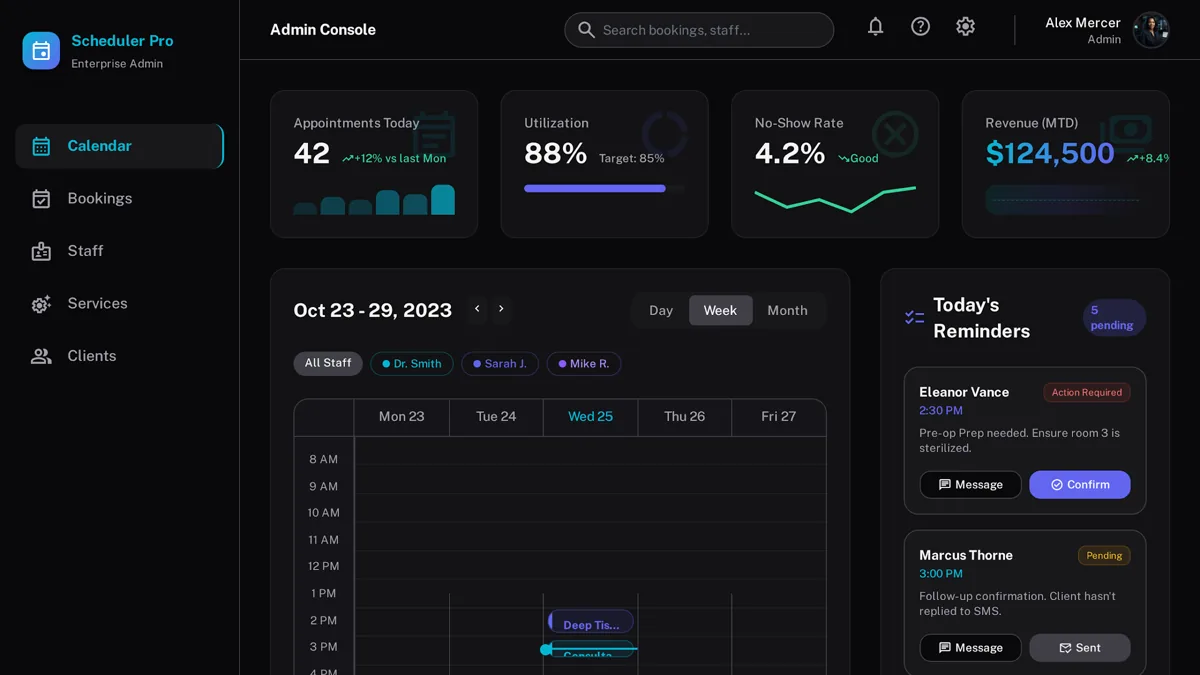
Custom appointment scheduling software showing a color-coded weekly calendar grid by staff member
10–30%
of a full build is what a lean first version typically costs — validate before you commit
MVP cost research
9.4 hrs
saved per employee each week just by connecting the tools a business already uses
Zapier

Why practices outgrow generic scheduling apps

Scheduling software that isn't built for your service mix eventually forces your business to bend around it.

Calendar that matches your staff structure

A weekly grid, color-coded by staff member, showing bookings, gaps, and overlaps at a glance instead of a flat list of appointments.

Service-specific durations and buffers

Different services get different slot lengths and prep or cleanup buffers automatically, not a one-size-fits-all time block.

No per-staff subscription fee

Add staff and locations without your monthly bill scaling per seat.

Fewer scheduling conflicts

Availability rules, time off, and skill-based routing prevent double-booking before it happens.

Client history in the same view

Past visits, preferences, and notes attached to each appointment instead of a separate client database.

Reporting built around your services

Booked hours, utilization by staff member, and no-show rate — without exporting anything to a spreadsheet.

What goes into custom scheduling software

The modules that make a scheduling calendar actually usable day to day.

Color-coded weekly calendar

A week-view grid with each staff member assigned a color, so gaps and conflicts are visible at a glance.

Availability and skill rules

Staff can only be booked for services they're qualified for, within their actual working hours.

Online self-scheduling

Clients pick a staff member and time slot directly from your website with real-time availability.

Automated reminders

SMS and email reminders tied to each appointment to reduce no-shows.

Waitlist and rebooking

Automatic waitlist offers when a slot opens from a cancellation.

Staff and utilization reporting

Booked hours, idle time, and no-show rate broken down per staff member.

FAQ

Generic booking tools are strong for simple one-person booking pages. Once you're scheduling multiple staff with different skills, service durations, and a color-coded calendar view your team actually works from, a custom build starts paying off.

Yes — that's the core view we build: a weekly grid where each staff member has a distinct color, so managers can spot conflicts and open slots instantly.

Yes. We build self-service rescheduling and cancellation within the rules you set, so staff aren't handling every change by phone.

A core scheduling build — weekly calendar, staff rules, and client self-scheduling — usually takes 5-7 weeks depending on the number of services and integrations.

Related

Get a free estimate for your scheduling software

Tell us about your staff, services, and booking rules — we'll scope a calendar system that fits how your team actually works.